How to Audit a Help Centre You Inherited
Someone left, and now a few hundred articles are yours. A one-week audit that ends with a decision against every page rather than a reading list.
Last updated
You will finish with a spreadsheet carrying one decision - keep, fix, merge or delete - against every article you inherited, and the deletions will already be done. The output is a decision record, not a reading list, because a reading list is what you have now.
Before you start
You need an export or full list of articles with URLs, publication dates and traffic figures; view access to whatever analytics exist; and, if at all possible, thirty minutes with someone who remembers why the help centre looks like this. Institutional memory is the thing that expires fastest after a handover, so book that conversation before anything else.
Steps
Export the full list before you read anything.
Every article, published and unpublished, with URL, title, date, author and page views. Reading first is the trap: you will spend two days deep in three articles and still not know how many you have.Add your decision columns while the list is still cold.
Traffic rank, subject area, decision, and a one-line reason. Filling these in from metadata alone gets you surprisingly far and keeps you out of the prose.Sort by traffic and draw a line under the top twenty per cent.
Help centre traffic concentrates hard. The articles above that line are the help centre as far as customers are concerned, and everything below it is inventory.Read only the articles above the line, and judge them for accuracy alone.
Not tone, not formatting, not house style. Accuracy is the only property that costs a customer anything, and it is the only one worth your attention in week one.Find the duplicates by title similarity.
Sort alphabetically and read the titles as a block. Inherited help centres reliably contain two or three articles answering the same question from different eras, and the older one usually outranks the newer one in search.Find the orphans.
Articles reachable from no category and no internal link. They are usually either abandoned drafts published by accident or genuinely useful pages that fell out of navigation, and the two are worth telling apart.Mark anything describing a feature that no longer exists as a delete.
A quick pass through the product answers this faster than reading the articles does. This is normally the largest single group and clearing it makes everything after it lighter.Do the deletions and redirects first, before any rewriting.
Every deleted URL gets a redirect to the nearest useful page. Deleting is the only step that reduces the size of the problem, and doing it first means the rewrite backlog you present to your manager is honest.Only then plan the fixes, in traffic order.
With deletions done and duplicates merged, the remaining fix list is normally a quarter of what you feared and can be scheduled rather than dreaded.
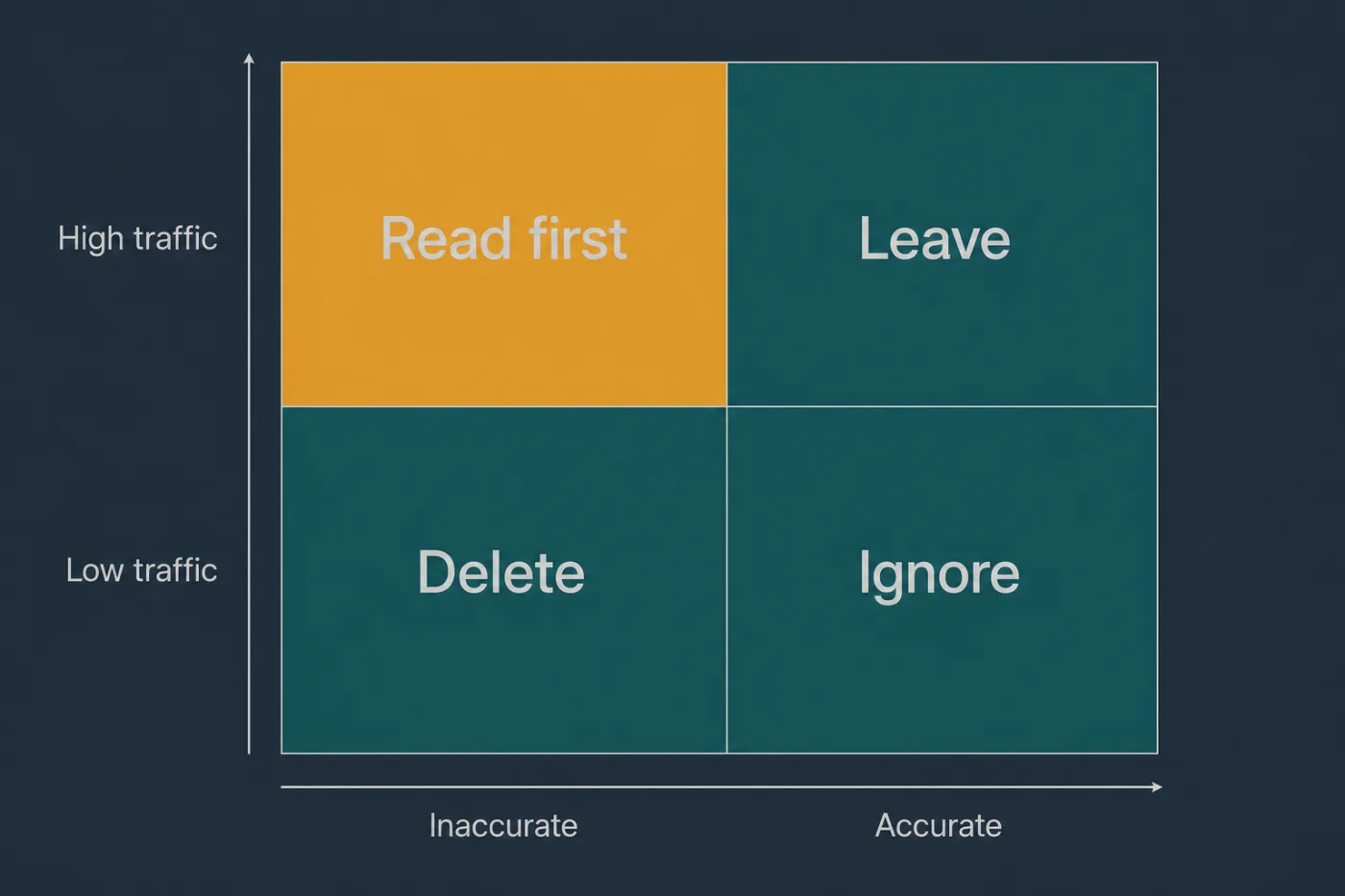
Sort on evidence you can gather without reading. Read only the top-left.
Common mistakes
Starting by rewriting the article that annoys you most. It is almost never the one that matters, and starting there means the audit becomes a rewrite project on day one and never produces the inventory that would have told you what to do.
Deleting without redirects. Inherited help centres have links pointing at them from in-app help, email templates, support macros and years of forum answers. Deleting a URL breaks all of them silently.
Keeping everything because you are new. Uncertainty pushes people to defer, and deferral leaves the next person with the same problem plus another year of content. If an article describes something that no longer exists, that is not a judgement call.
Trusting the existing category structure to tell you what exists. Inherited taxonomies describe an older version of the product and often hide the worst content in a section nobody opens. Work from the flat export instead.
Auditing without traffic data. Without it, every article looks equally important, which means the audit has no order and no stopping point. If analytics are genuinely missing, install them and wait two weeks before starting - the wait costs less than the wasted pass.
When this stops scaling
A one-week audit works up to roughly one to two hundred articles. That is about the point where a single person can still read the top twenty per cent, scan every title, and hold the duplicates in their head at the same time.
Above that, two things break. The reading itself stops fitting in a week, so the audit runs into a second and third week and the early rows start going stale before the late ones are filled in. And the top twenty per cent stops being a fair summary of what people read, so the tail you deliberately skipped starts containing real damage.
There is also a limit that has nothing to do with size: an audit is a snapshot. The day after you finish, the product ships something, and nothing in the process tells you which of your freshly-approved articles that change invalidated. Teams respond by scheduling another audit, which is the most expensive possible way to answer a question that a diff answers directly.
SupportPages works from the codebase instead - it flags the articles a merged change makes suspect, so what you maintain after the audit is a queue rather than another calendar event. If you inherited this help centre because the last audit never finished, that is the pattern worth breaking.