How to Get Help Articles to Rank
Help content ranks on intent match more than on effort. Take the phrasing from your own support inbox, give each question exactly one page, and structure the page for the reader who lands mid-way down it.
Last updated
You will finish with a small set of articles retitled and restructured around the phrases people actually type, and the technical reasons a help centre fails to appear ruled out. Google publishes what it rewards - its Search Essentials and its May 2026 guide to optimising for generative AI features both come down to indexable pages carrying something a reader could not get elsewhere - so the steps below follow that rather than guessing at a mechanism.
Before you start
You need Search Console verified for the help centre hostname, your site search logs, and a sample of recent support tickets. The tickets matter most. They contain the exact words customers use for your features, and those words are usually not the words on your marketing site.
Steps
Harvest real phrasings from support tickets and site search.
Take a hundred recent ticket subject lines and the top two hundred site search queries. This is your keyword research, it is specific to your product, and it costs an afternoon rather than a subscription.Group the phrasings by the question behind them.
"Card declined", "payment failed" and "why was I charged twice" are three questions, not one topic. Grouping by underlying question is what determines how many articles you need.Assign exactly one article to each distinct question.
Two articles targeting the same query compete with each other, and the search engine picks one - usually the older, not the better. One question, one page, is the single highest-leverage rule here. The unit is the intent, not the phrasing: a page for every variant of the same question is what Google's scaled-content policy names, and it ranks worse than one good page.Title the article as the question, in the reader's words.
"Why your card was declined", not "Payment processing overview". Feature names belong in the body; the title is for the person who does not yet know your vocabulary. Put the specific terms readers search for - the error message verbatim, the exact button label, the customer's word alongside your own - in the title and the opening lines, because those are the words a reader scans the result for.Make every heading a question or a task.
"Resetting a password" and "What to do if the reset email never arrives" both work. "Notes" and "Additional information" tell a reader scanning the page nothing about whether their answer sits under them.Answer in the first two sentences.
Before the prerequisites, before the context. Readers decide within seconds whether the page will help, and a page that opens on background is one they leave before reaching the answer.Confirm the page is crawlable and indexable.
Fetch it as a crawler would: checkrobots.txt, check for a straynoindex, and check the content is present in the raw HTML rather than assembled by JavaScript after load. A help centre that requires a login to read cannot rank at all, and that fact surprises people every year.Link to the article from related articles, using descriptive anchor text.
Internal links are how crawlers find deep pages and how they infer what a page is about. "See the article on declined cards" is worth more than "click here", and both are worth more than an orphan.Give the URL a stable, readable slug and never change it casually.
/declined-cardrather than/article/1042. If you must change one, redirect the old URL permanently. Give every heading a stable anchor as well: deep links from support replies point at a section, and changing the heading text silently breaks every one of them.After six to eight weeks, read the query report and re-title the near-misses.
Pages appearing at positions five to fifteen for a query whose wording differs slightly from the title are the cheapest wins available. Adjust the title to the query and check again a month later.
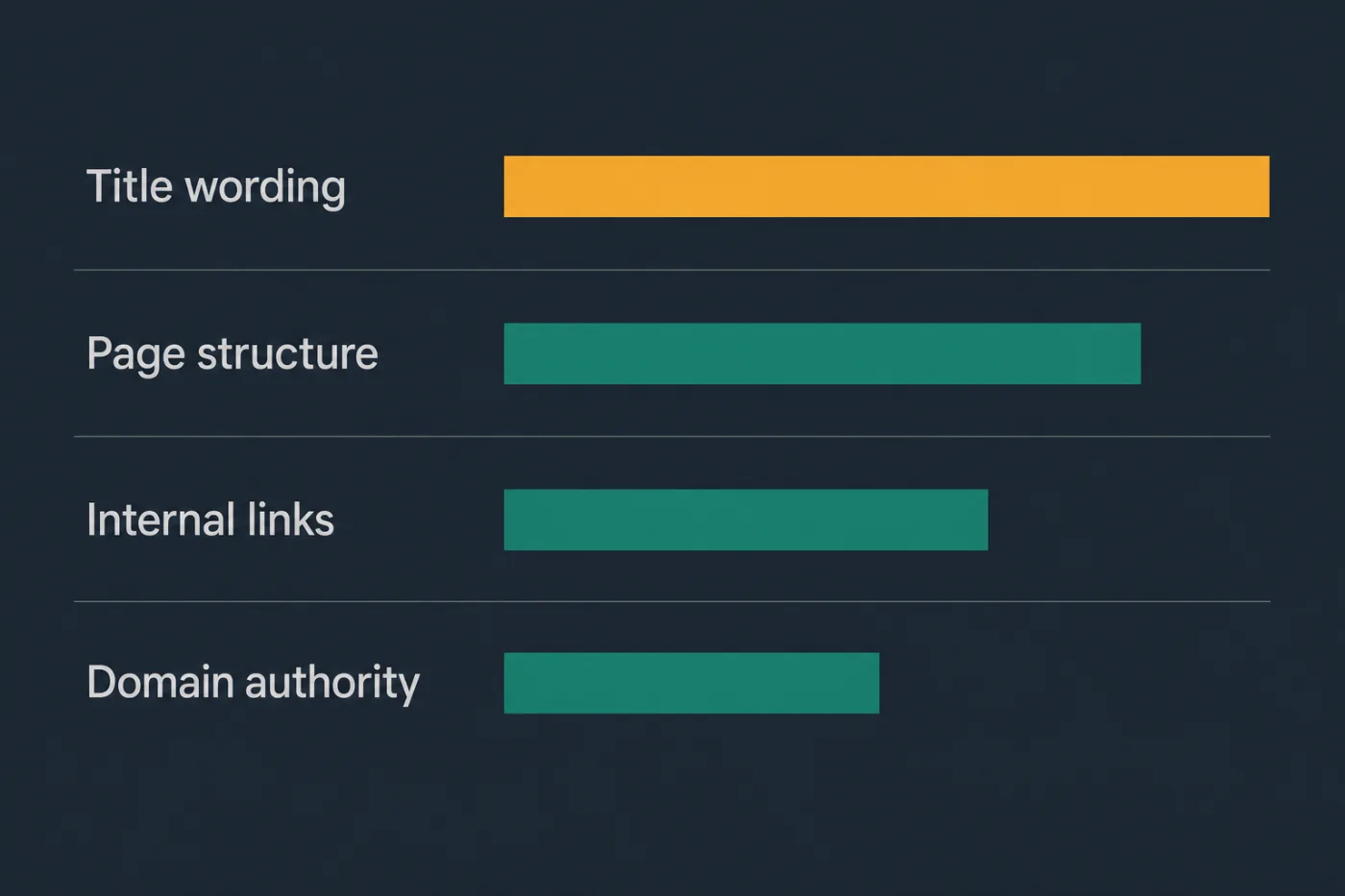
The two you control most are the two most teams change last.
Common mistakes
Naming articles after internal features. Customers search for the problem, not for your product's name for the subsystem that causes it. An article called "Webhook retry semantics" never meets the person searching "why did my notification arrive twice".
Publishing one long article covering eight questions. It half-answers all of them, ranks for none of them clearly, and cannot be excerpted into a useful result. Split by question.
Requiring a login to read documentation. Gated content is invisible to search engines, so the article can neither rank nor be linked. If parts genuinely must be private, keep the public and private sets separate rather than gating everything.
Repeating the target phrase throughout the body. Modern ranking systems handle synonyms and phrasing variation. Repetition reads badly to the human who arrived, and the human is the one who decides whether to stay.
Judging results after two weeks. New pages take weeks to be crawled, indexed and settled, and a help centre with modest authority takes longer. Changing the title again at week three destroys the only evidence you were about to gather.
When this stops scaling
Per-article optimisation is honest work and it holds while you have more hours than articles. At twenty or thirty pages you can title each one deliberately and revisit the near-misses each quarter.
The threshold is roughly one hundred articles, or the point where the quarterly review would take longer than a week. Past that, most pages never get revisited, and the ones that do are chosen by whoever remembered them rather than by the data.
There is a harder limit underneath. The ranking factor you control least is whether the article is still correct, and accuracy decays with every release. A page that ranked for two years and now describes a flow that changed keeps its position for a while, sends readers a wrong answer, and then loses the position - by which point the loss looks like an algorithm change rather than what it was.
At that scale the work stops being keyword research and becomes keeping a growing corpus true. SupportPages flags the articles a merged change makes suspect, which is the maintenance half of ranking rather than the acquisition half. If your best-performing article has not been checked since it started performing, that is where the risk is.